 Please contribute to the support of FreeForm. All I ask is $1 per each month used.
 EAPH.com Hosting The most convenient and helpful to use with FreeForm.
| FreeForm |
| This is the FreeForm Startup Page - leave this window open while using FreeForm! WHY? |
| Notes: The Advanced Builder'B' is the current (best) version. If you have any reason to use the previous version (Builder'A') you may do so here: BuilderA on eaph3.com. If you have any need to use the very oldest version of the Builder you may do so here: Legacy Builder. Anything created and saved with the older Builders can be loaded into and used with Advanced Builder'B' so you do not need to keep using the older versions! | |
|
Please contribute to the support of FreeForm. All I ask is $1 per each month used.
|
EAPH.com Hosting The most convenient and helpful to use with FreeForm.
|
|
Top | ||
AOL members who access the Internet through the AOL network are advised to use AOL 7.0 or higher. It has been reported that AOL's network does not support the older versions as well as the newer ones. |
|
Top |
FreeForm readily enables the display of multiple images (photos, grapics, logos, etc.) in your presentations without needing to learn HTML. However, before you can display images in your presentations you will need to:
As mentioned above, you will need to learn how to use URLs (Internet Addresses). A URL looks like this: and FreeForm helps you use them by providing a point and click "Choose from" ability to get URLs for images without needing to type or copy and paste them. The point and click is compatible with Earthlink, EAPH.com, and many Other hosts. |
|
Top | |
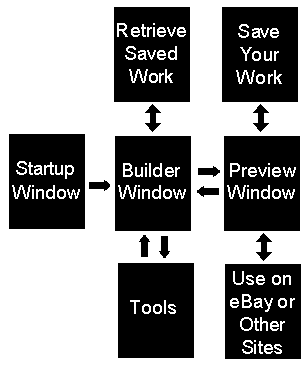
| FreeForm is an online program that runs through your Internet browser and makes use of multiple browser windows. The process is easy because the windows are opened and closed automatically for you as you use FreeForm. | |
|
The Startup Window (the one you are in now) is used to launch the Builder and for temporary storage of data from the Builder window.
The Builder window is where you may load the ingredients of previously saved presentations and is where you modify them or build new ones. From the Builder window various "tools" are also opened into their own windows. You will always know where you are and will, by default, land back in the Builder when you are finished with any tool. The Preview Window is used to display what was created in the Builder. In the Preview window you are provided with a menu from which you may save your work or use what you've created for eBay or any other online venue that accepts HTML. |
| Usually many trips to the Preview window are desireable during the course of creating a presentation. When you click on any part of your presentation, the Preview window will close and you'll be positioned at the Builder Input Area that controls the part of the presentation you clicked on. If you are not familiar with using multiple windows here's a tutorial: Using multiple web browser windows | |
|
Top | |
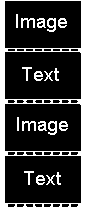
| FreeForm's Builder is based on "Input Areas". Each Input Area is designed to accept and display different parts of your presentation. A Picture Input Area, for example, controls the display of a picture (photo or graphic image). | |
|
You build your presentations by inserting (or removing) the various types of Input Areas where you want them. What you place in the Builder then appears in that same sequence when you Preview it.
Within each Input Area are controls to configure how that part functions and appears in the presentation. Configuring the Builder is easy. Between each Input Area in the Builder there are buttons to insert any of the various types of Input Areas where you want them. |
| An excellent selling technique is to show a picture, then write about it, then show another picture, then write about it, etc. That is accomplished by inserting a Picture Input Area, then a Text Input Area, then a Picture Input Area, etc. You are in control over how much or how little information you desire to present. | |
|
Top |
|
Saving in FreeForm consists of storing the "ingredients" of your presentation -- the Input Areas used, their sequence, and their contents -- into "containers" residing on either the robshelp.com or EAPH.com websites. Once saved into a container those ingredients can then be loaded back into the Builder on a future occasion. Those containers become your own custom templates for use as the starting point for listing different items.
One of the first things you should do when learning FreeForm is practice saving! Not just the temporary Quick Save, but permanently save via the menu on the Preview page. So you don't get confused write this down if you need to: Saving is done from the Preview Page, Retrieving (loading) is done from the Builder Page |
|
Email Registration (enables saving in FreeForm - Privacy Statement)
Register to Obtain Password  Change your Password
Password Reminder
Change your Password
Password Reminder
|
|
Top |
|
Behind the scenes, FreeForm translates Input Area selections and their contents into HTML "code" each time you go to the Preview page. Getting to that HTML so you can use it on eBay (or use it anywhere else) is done from a menu of buttons and links located in the Preview page.
To use a saved description/presentation: First Restore it to the Builder, then go to Preview, then click on the appropriate button in the menu on the Preview page (in the same area at which you find the Save buttons). |
|
Top |
You may find yourself asking:
"I like what others are doing with FreeForm but I don't know where to begin!"
Getting Started With FreeForm Includes an interactive tour that is definitely the best way to get started using FreeForm! Visual Printable Guide A short outline of how FreeForm works. You'll get a better start taking the interactive tour.  Tutorials including screen captured video showing FreeForm in action.
7 tips for creating better presentations using FreeForm. EAPH.com Infocenter Includes some good basic advice and explains the benefits of using "Your Own Hosting" (third party hosting) on eBay. Getting Started with EAPH An outline of instructions for preparing photos to display in the body of eBay descriptions or elsewhere on the Internet. rob@robshelp.com I'm here to help too! Good Luck! ~Rob |
|
Top |
| In deference to people who may have poorer eyesight (I'm one of them) text is not locked in to display at any particular point size in FreeForm's pages. All the sizes used are "relative" to however your browser is set to display text size. If the text in FreeForm either appears too large or too small, all you need do is a simple adjustment in your browser settings. In Internet Explorer, Mozilla Firefox, and Netscape you'll find the setting in the toolbar under "View". Make yourself comfortable! |
|
Top |
|
FreeForm is supported entirely by voluntary contributions. Creating, maintaining, and improving FreeForm has been a very enjoyable personal project of mine for many years. It was born of a desire to help level the playing field on eBay by enabling "regular folks" to produce attractive and effective auction descriptions without shelling out big bucks or needing to learn HTML.
There are no associations with third party advertisers in FreeForm. No information of any kind is provided to or shared with any third parties. The registration process to perform Standard Saves in FreeForm requires an email address. Email addresses are protected from public access and are only used for the purpose of providing passwords, password reminders, and as IDs for saving and loading Builder contents. Cookies are available in FreeForm for your convenience. Those cookies are "first-party" cookies only, which means they are not readable from any other than the FreeForm sites. The option is provided in every instance to choose or not to use them. © 2000-2014 Rob Bell |